Showing posts with label Meritum Paint Pro. Show all posts

Wednesday, December 7, 2011

Number Sixty-Eight: I Quit While I Was Ahead

I've been having a lot of fun playing around with Artist's Touch and seeing what it's capable of. I imported a heart doodle that I'd done previously using Meritum Paint Pro because I liked the colours and wanted to see how the various brush effects handled them. One of the things that Artist's Touch does, however, is overlay a blueprint of the picture you're using on the canvas. You can turn it off if you like but I was pleasantly surprised by how much more I liked the blueprint of the original picture.

So I took a screenshot and here it is!

Tuesday, November 22, 2011

Number Fifty-Three: A Horse is a Horse

But, you might cry, this project is called ART On My iPhone, no?

Sometimes my iPhone is also used as a toddler distraction system. I have a little folder of toddler-friendly apps but I also use my art apps to amuse and entertain Essie. Sometimes she wants to draw, sometimes she asks me to draw things for her.

Meritum Paint Pro is a good app for quick fun drawings since depending on what settings you have applied it takes on a life of its own when you paint with it. So when Essie uses it I usually have it set so that there are lots of tendrils and movement. Then she demands a pig or snowman or dinosaur and I quickly change the settings so that I can draw a recognizable form.

YES, this is a recognizable form. Essie immediately recognized it as a horse and likes it so much that every other day or so she asks to see the horse and isn't happy until I pull this up and show it to her. I laugh every time I see it, but to her it is art so who am I to argue?

Tuesday, October 25, 2011

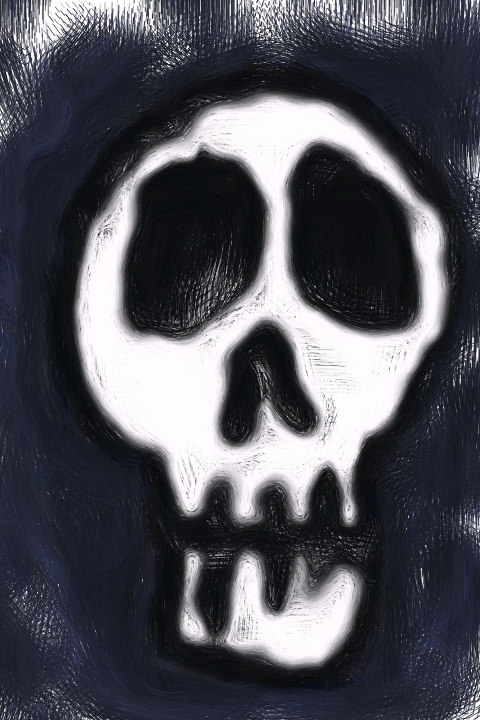
Number Twenty-Five: Sci-Fi Skull

I drew this skull in Meritum Paint Pro using the sci-fi tool. After I finished that I exported it to Adobe Photoshop Express and used the White Glow effect on it to lighten it up a little.

The more I use the Meritum app the more I like it. It makes drawing even the simplest things fun and challenging but the effect is always interesting, even if it wasn't exactly what I was going for.

As always; click the picture for a bigger view!

Saturday, October 22, 2011

Number Twenty-two: A Ghostly Skull

I started this skull in Meritum Paint Pro and finished it off in Corel's Paint It! Now with the oil filter. The combination of those two apps has become a favourite of mine and produces some very funky pieces of art.

Maybe it's the nearness of Halloween inspiring me to create skulls lately? I've always loved drawing, painting and sculpting skulls so this is no surprise. I'll very likely have at least a couple more before the end of the month.

Make sure to click the drawing to see it at full size.

Tuesday, October 18, 2011

Number Eighteen: Autumn Tree

Today's picture was first drawn using the Meritum Paint Pro app. I drew it all using the cartoon and sci-fi drawing mode, then saved and imported it to Corel's Paint It! Now app where I used the oil setting.

Meritum Paint Pro is a pretty cool drawing tool once you familiarize yourself with the drawing options and settings. I find it extremely meditative to draw randomly with the force set on high and just watch the tendrils shoot around. If you set it so that the force, tilt and width are low it's pretty effective for controlling placement of lines and details but that does take a bit of the fun out of it.

Corel's Paint It! Now is another app that is intended to give photographs a painted appearance. It has five different painting options ranging from Pen and Ink to Oil. Oil is my favourite (with Impressionist running a close second) because it can do bizarre things to pictures I've drawn in other apps. In tomorrow's entry I'll be discussing my personal preferences when it comes to using filters like these ones on photos but right now I'll just say that I love messing around with my drawings in apps that do this.